You Choose
When you connect to a past project or container model, Details will create a live link which is completely local to your machine. You decide which models to sync in the cloud for faster display.
Bring AI into your Revit workflow. Get 6 months free for being a founding user of Recs.
Compared against the native import function.
Revit Plug-in for Engineers and Architects
Navigate your entire detail library in seconds, with the click of a button.
Comfortably load thousands of details at once. It's really that fast.

Recs scans your active projects and uses Gemini to recommend 30 details that match your scope — pulled from past projects and your firm's container model. Disciplines are auto-sorted so you can find what you need instantly.
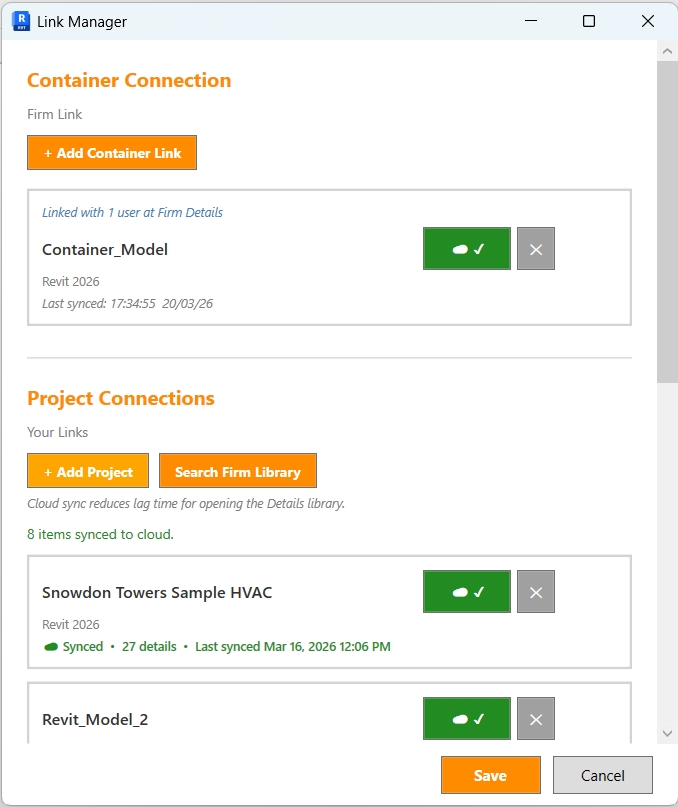
Manage all your connections from one window. Link to container models shared across your firm, add past projects to pull details from, and search the entire firm library. Cloud sync keeps everything up to date.

Create standardized detail sheets with firm-wide naming conventions, sheet numbers, prefixes, and detail spacing — all pre-configured. Upload templates to your firm so every team member places details consistently.
Switch between past projects, your firm's container models, and Your Library — all from one window. Your Library automatically centralizes every detail from every connected source, with search, discipline filters, and custom tabs.


Select any detail from your library and paste it into your project's sheet. No more navigating through folders or switching between windows — just pick the detail you need and place it exactly where it belongs.
Create tabs to group your details. Organize by discipline, project type, or however your team works best. Your library stays clean and searchable as it grows.
Adjust the layout to match any detail size and spacing. Whether it's a small plumbing riser or a full-page mechanical schedule, Details adapts to fit your sheet exactly the way you need it.
See how much your firm could save each year with Details.
Details plug-in lets users quickly find details from their library and create polished sheets with self-organized details. Build a sheet creation template once, and share it across the entire firm so every project uses the same exact detail spacing and layout.
When one team member sets up a template, everyone benefits. Projects across the firm maintain a consistent, professional look without any extra coordination.

Zero risk, zero hassle.

When you connect to a past project or container model, Details will create a live link which is completely local to your machine. You decide which models to sync in the cloud for faster display.
For large container models, you share the cloud data with your firm so when one user syncs everyone gets the latest version.
Differential syncs mean that when the container model is updated, only the details that have changed will be synced to the cloud. So syncs take seconds instead of minutes.
Details never uploads Revit models, files or geometry to the cloud. All model parsing for data occurs locally on the user's machine. Cloud syncs only pull non-sensitive data (what is necessary) for easily searchable details. To learn more about how we protect your data in the cloud, please see our Cloud Data Usage & Security page.
Built for how engineers and architects actually work.
Live links refresh every time you open a project. Your team always works with the latest firm standards.
As engineers and architects pull details from past projects, their personal library grows automatically. Library building happens naturally, without extra work.
Works with your existing container files and projects. No need to duplicate content or change how your firm organizes details.
Yes. Details connects directly to your firm's container models without requiring migration or duplication. Your existing file structure stays intact.
No. Details works with your existing container files and past projects. Your library builds automatically as you use the system.
No. Only thumbnail images of relevant details and non-sensitive metadata are uploaded. Full Revit models, files, and geometry stay on your machine.
Thumbnail images of details for immediate viewing in the plugin; detail metadata (discipline and sub-discipline); project metadata; family names; annotations; and file paths. No Revit models or full project files are stored.
Yes. Admins can permanently delete any synced project data from the cloud during a firm's subscription, or wipe the entire firm library permanently if cancelling the firm's subscription.
See how Details can improve your team's workflow.
"Details was created to solve a problem I faced on every project as an MEP engineer: too much time wasted searching for details that should be at my fingertips. I noticed that typical content managment systems miss the most important thing when it comes to building a system for engineers: their workflow. This plug-in is built for how you actually work, so you never have to leave your Revit project when you design." - David, Founder of Details
Dig through old projects. Ask coworkers for details. Recreate something that already exists. Details fixes that.
Waste time opening archived files and hunting through folders just to locate a detail your firm already created.
Break your workflow to message teammates, hoping someone remembers where the right detail lives.
When you cannot find the right drafting view fast enough, you redraw work your firm has already done before.
Details brings your firm's proven content into Revit instantly so engineers can stay focused on design instead of searching.
Use firm-level data to make smarter decisions.


Monitor license usage, see cloud sync trends by discipline, and understand how your firm's detail library is growing — all from a single admin dashboard.
Only firm admins can see real-time metrics on which projects are being synced most frequently. When your BIM team can see exactly which projects are being pulled from again and again, they know which details belong in the container file.
Instead of guessing which standards to maintain, your team gets clear, data-driven signals. The most-used details rise to the top. This means your container stays relevant, your library stays lean, and your firm never wastes time recreating what already exists.
Engineers and architects shouldn't spend their time hunting through old projects and container files to find the perfect detail.
Engineers and architects spend countless hours navigating file systems, asking colleagues, or recreating details that already exist somewhere in the firm's project history.
The default drafting-view browser is restrictive and outdated. It doesn't support the way modern firms actually organize and share details.
Proven details from completed projects sit locked away in archived files. Every engineer uses old project details when working on new projects. We built a system that connects users to projects within the firm.
Your firm's library collection of existing projects and details that can be searched smarter by equipment, keywords, and detail titles.


Verified users in the firm can have quick access to relevant details in the firm's cloud library. Admins can hide or delete details from the library as needed.
MEP engineers using Revit. BIM managers managing detail libraries. Firms tired of messy container files.
Find and place the right details without breaking your design workflow or leaving your active project.
See which details matter most, keep standards current, and build container content around real usage instead of guesswork.
Replace bloated, disorganized drafting-view libraries with a system built around fast search, visibility, and reuse.
Smart, persistent connections that work how you work.
Details works with your existing files and organizational structure. We don't force you to move content into a proprietary system.
As engineers and architects naturally pull from past projects, the system builds your library without upfront work or disruption. Details also allows for sharing of sheet templates across the firm. Which means detail sheets are always consistent and professional.
Live links mean your team always sees the latest details in the container model. When your BIM team updates the container model, users get those updates instantly.
$0
6 months included (Founding user trial period)
$20/mo
Per seat, per month
Volume Discounts
Details is built for firms who need fast access to their detail libraries without compromising security or privacy. We believe your firm's project data belongs to you. This statement explains how we protect your data in the cloud and our commitments regarding data sharing and retention. Cloud syncs only pull what is necessary for easily searchable details. Syncs pull detail thumbnails for fast display in the plugin and basic project metadata like the file path and file name for fast retrieval of details, as well as more in-depth Revit metadata for better grouping of details—like discipline, sub-discipline, associated equipment names, and keynote annotations. When project filepaths are added to the Firm Library, usernames are stripped from the data to protect individual user privacy. We do not save any Revit files or full project files in the cloud.
Details uses Google Firebase (Realtime Database, Cloud Storage, Authentication, and Cloud Functions) to host firm cloud data and securely handle AI requests. Firebase provides enterprise-grade security infrastructure trusted by organizations worldwide. All data is encrypted at rest and in transit. There are no additional storage fees — cloud storage is fully included in your monthly subscription regardless of how many projects your firm syncs.
When Recs is used, AI requests are sent through a secure Firebase Cloud Function that verifies the user's Firebase Authentication token before any request reaches Gemini. This means only authenticated users can access AI features, and all AI traffic is gated by the same Firebase identity system used throughout Details.
The Gemini API key is stored in Google Secret Manager and only exposed server-side at runtime. It is never embedded in the plugin, website, or client-side JavaScript, so users cannot extract or reuse it.
Only non-sensitive metadata is sent for AI analysis, such as detail titles, disciplines, family names, annotations, and other lightweight organizational data. Full Revit models, geometry, and complete project files are never uploaded to Gemini. AI results remain firm-scoped, and your firm's data is not used to train AI models.
Each firm's project data is stored in a completely separate partition in the cloud. Firm A cannot see, access, or modify Firm B's data under any circumstances.
Isolation is enforced at the infrastructure level through Firebase Auth custom claims. When a user is created or their role changes, a server-side Cloud Function automatically embeds their firm ID and role directly into their authentication token. Every database read/write and every file upload/download is validated against these claims before access is granted. This means access control is enforced by Google's servers — not by client-side code that could be bypassed.
Specifically, the security rules verify that:
Even if a user knew another firm's internal identifiers or storage paths, the request would be rejected at the server level. There is no API endpoint, query, or workaround that allows cross-firm access.
Within a firm, each user's synced projects are stored under their own unique identifier. One user's library does not mix with another user's library, even within the same firm.
All cloud read/write operations are validated against the firm's active license. The database rules verify two conditions before granting access:
If a license is deactivated, cloud access is immediately revoked.
Each license key can only be active on one computer at a time. A unique machine fingerprint (hardware-based hash) is registered when the license is activated. If someone tries to use the same key on a different machine, access is denied.
The database security rules enforce that a user can only access data under their own firm ID and their own user ID. Even if a user had knowledge of another firm's identifiers, the rules would block the request.
When the plugin connects to a Revit project for syncing, it opens the file in a read-only, detached mode. The original project file is never modified, and workshared models are not affected.
If a user removes a project link locally, the cloud data is preserved to prevent accidental data loss. However, firm administrators can permanently delete any synced project details from the Firm Library at any time. Deleted data is removed from the cloud and cannot be recovered.
The machine fingerprint used for single-computer activation is generated using SHA-256 hashing, a one-way cryptographic function. The actual hardware identifiers are never stored or transmitted—only the irreversible hash.
All communication between the plugin and the cloud (license validation, metadata sync, thumbnail upload/download) uses HTTPS encryption, protecting data in transit.
Data is hosted on Google's Firebase platform in the US-Central region. Firebase provides enterprise-grade infrastructure security including data encryption at rest, automatic backups, and 99.95% uptime SLA. All firm data resides within United States data centers. Read more about Firebase security here.
We do not sell, rent, or share your firm's data with third parties. Your synced projects, detail thumbnails, metadata, and firm library content are never shared with advertisers, partners, or other firms. We do not use your firm's data to train AI models or analyze your project content for purposes other than delivering the Details service to you.
Synced data exists to power the Details plugin and Firm Library for your firm. We do not retain copies for our own use. When a firm ends its subscription, all project data is permanently deleted as part of the termination process. Cloud syncs pull only what is necessary: detail thumbnails, file paths, and metadata for search and grouping—not full Revit models or proprietary design content.
Firm administrators have full control over their cloud data. Admins can permanently delete individual synced projects from the Firm Library, or wipe the entire Firm Library at once — permanently removing all synced project data from the cloud. Once deleted, the data cannot be recovered by Details or any third party.
Project data is never synced to the cloud automatically. Users must explicitly click to sync a project, giving your firm full control over which projects are stored in the cloud and which remain entirely local. This ensures sensitive or classified projects can stay completely off the cloud.
Details is built on Google Cloud and Firebase infrastructure, which holds the following certifications and authorizations:
While these certifications apply to the underlying infrastructure rather than to Details as a standalone product, they mean your firm's data is stored, transmitted, and managed on infrastructure that meets the highest industry standards for security and compliance. Details does not store Revit models, full project files, or proprietary design content in the cloud — only lightweight metadata and thumbnails needed for search and display.
See how Details fits into how your team actually works.

Your personal AI assistant for your Revit details.
Recs analyzes your synced projects and chooses the most relevant details based on your project.
Powered by Google Gemini, built for your workflow.
Recs reviews non-sensitive metadata from your active Revit project — detail names, annotations, and family names — to understand what your project needs.
Your firm's synced project library becomes a knowledge base. Recs compares your current project against past projects to identify details that were commonly used in similar contexts but are missing from your sheets.
Recs checks your firm's container models to find details that align with your project's discipline and Revit version. It surfaces the most relevant details so your BIM team's standards are always reflected in new work.
Your data stays protected at every step.
Recs only processes lightweight metadata. Full Revit models, proprietary geometry, and project files are never uploaded to the cloud or shared with the AI.
Every request to the AI is authenticated through your Firebase account and transmitted over TLS 1.2+. The Gemini API key is stored in Google Secret Manager — never exposed to the client.
Recommendations are generated exclusively from your firm's own data. Recs never mixes or shares data across firms. Recs does not use your firm's data to train its AI model.
Recs is available to all Details Pro subscribers.
